



Completing a Schedule R tax credit application can reduce your federal tax bill by up to $7,500, yet it remains one of the most overlooked credits available to seniors and people with disabilities. This guide walks you through the documentation side of Schedule R, including what it is, who qualifies, and what paperwork the process requires. The IRS processes the return. We document. That distinction matters: we do not prepare or file your taxes for you, and nothing in this guide should be considered tax filing services. If you are 65 or older, or retired due to permanent and total disability, understanding the documentation behind Schedule R can be one of the most valuable steps you take during tax season. This guide covers who qualifies, what records you need, how the five-step calculation works, and how to attach the form to your return. It also covers property tax relief, which is important to understand early: those exemptions are handled through your county assessor’s office as a separate program from anything filed with the IRS, although many readers who qualify for Schedule R may qualify there as well.
What Is the Schedule R Tax Credit Application and Who Qualifies
Schedule R (Form 1040) is the federal form used to calculate the Credit for the Elderly or the Disabled. According to IRS Schedule R overview, the credit is calculated on this schedule and then reported on Schedule 3 (Form 1040). It is a nonrefundable credit, meaning it can reduce your tax liability to zero but will not generate a refund above the amount of tax you owe. Despite its value, it is frequently missed because it requires active steps to claim and because many qualifying taxpayers do not realize they meet the eligibility criteria.
The Two Pathways to Qualifying: Age 65 or Permanent Disability
You qualify for the Schedule R tax credit application if you are a U.S. citizen or resident alien and either of the following applies. First, you were age 65 or older at the end of the tax year. You are considered to be age 65 on the day before your 65th birthday, so if your 65th birthday falls on January 1, you are treated as turning 65 during the prior tax year. Second, you were under age 65 at the end of the tax year and all three of the following are true: you retired on permanent and total disability before the close of the tax year, you receive taxable disability income, and you had not yet reached your employer’s mandatory retirement age. A person is permanently and totally disabled if they cannot engage in any substantial gainful activity due to a physical or mental condition that a qualified physician determines has lasted or can be expected to last continuously for at least a year, or that can be expected to result in death.
Income Limits That Determine Schedule R Tax Credit Application Eligibility
Qualifying as an eligible individual is only the first hurdle. Two separate income limits must be satisfied. The first is your adjusted gross income (AGI). The second is the combined total of your nontaxable Social Security benefits, nontaxable railroad retirement benefits, nontaxable pension income, and other nontaxable disability income. The credit phases out as these amounts rise. For single filers, the AGI limit is $17,500 and the nontaxable income limit is $5,000. For married filing jointly where both spouses qualify, the AGI limit is $25,000 and the nontaxable income limit is $7,500. For married filing jointly where only one spouse qualifies, the AGI limit is $20,000 and the nontaxable income limit is $5,000. These figures are based on the Schedule R income thresholds confirmed in the current Schedule R instructions. According to IRS 2026 filing season updates for seniors, the maximum income threshold for claiming the Earned Income Credit for the 2025 tax year is $68,675, though the specific Schedule R thresholds above are lower and apply strictly to the elderly and disabled credit.
What Counts as Taxable Disability Income Under the Rules
For filers under age 65, taxable disability income is required to qualify. The Schedule R instructions confirm that disability income must be paid under an employer’s accident or health plan or pension plan and must be included in your income as wages or payments in lieu of wages for the time you are absent from work due to permanent and total disability. Lump-sum payments for accrued annual leave received at retirement do not count as disability income. Amounts received after reaching mandatory retirement age also do not qualify. Social Security disability benefits are generally nontaxable and therefore do not satisfy the taxable disability income requirement, though they do affect the income limit calculation at Step 2 of the credit formula.
How to Get Schedule R: Documents and Preparation Before You File

Knowing how to get Schedule R filed successfully starts with gathering the right documents before tax season. Missing a single piece of documentation is the most common reason this credit is either filed incorrectly or abandoned altogether. The following items should be assembled before you begin.
The Physician’s Statement Requirement for Disabled Filers Under 65
If you are under age 65 and claiming the credit based on permanent and total disability, a physician’s statement is required. You must have your physician complete the Statement of Permanent and Total Disability in Part II of Schedule R. However, if you obtained a physician’s statement for 1983 or an earlier year, or if you filed or obtained a statement for a tax year after 1983 and your physician signed line B of the statement confirming the disability is expected to continue indefinitely, you do not need a new statement each year. Instead, you check the box in Schedule R Part II that applies to your situation. This is an important efficiency for disabled filers managing ongoing conditions: once the statement is on record with the correct certification, you carry forward the qualification without repeating the physician visit each filing season.
Gathering Your Income Documents: SSA-1099, 1099-R, and W-2
You will need several income documents to complete the Schedule R calculation accurately. Your Form SSA-1099 from the Social Security Administration shows the total amount of Social Security benefits received and the nontaxable portion, which is entered at Step 2 of the calculation. Your Form 1099-R reports distributions from pensions, annuities, and retirement plans, some of which may be nontaxable and also factor into the Step 2 reduction. Your Form W-2 reports wages and taxable disability pension income, which forms the basis for your AGI and for the taxable disability income requirement if you are under 65. According to Social Security income guidance, if you did not receive your SSA-1099 you can request a replacement online through a my Social Security account at SSA.gov.
Choosing Between Filing It Yourself or Asking the IRS to Figure the Credit
You have two options for completing the Schedule R calculation. You can work through the five steps yourself using the Credit Limit Worksheet in the Schedule R instructions, or you can ask the IRS to figure the credit for you. According to the Schedule R instructions, if you want the IRS to figure the credit, you check the appropriate box in Part I of Schedule R, complete Part II and lines 11 and 13 of Part III if applicable, and then write “CFE” on Schedule 3 (Form 1040), line 6d. The IRS will calculate the credit based on your return and adjust accordingly. For most straightforward situations, asking the IRS to figure the credit is the simpler path. For filers who want to verify the credit amount in advance or whose situation involves multiple income types, working through the steps manually provides greater clarity.
Schedule R is just one of the tax benefits you may qualify for. Rocket Records identifies every federal and state benefit available to you based on your health and income profile, including tax credits, prescription savings, and disability parking: Check Your Full Eligibility at Rocket Records
The Five-Step Schedule R Tax Credit Application Calculation
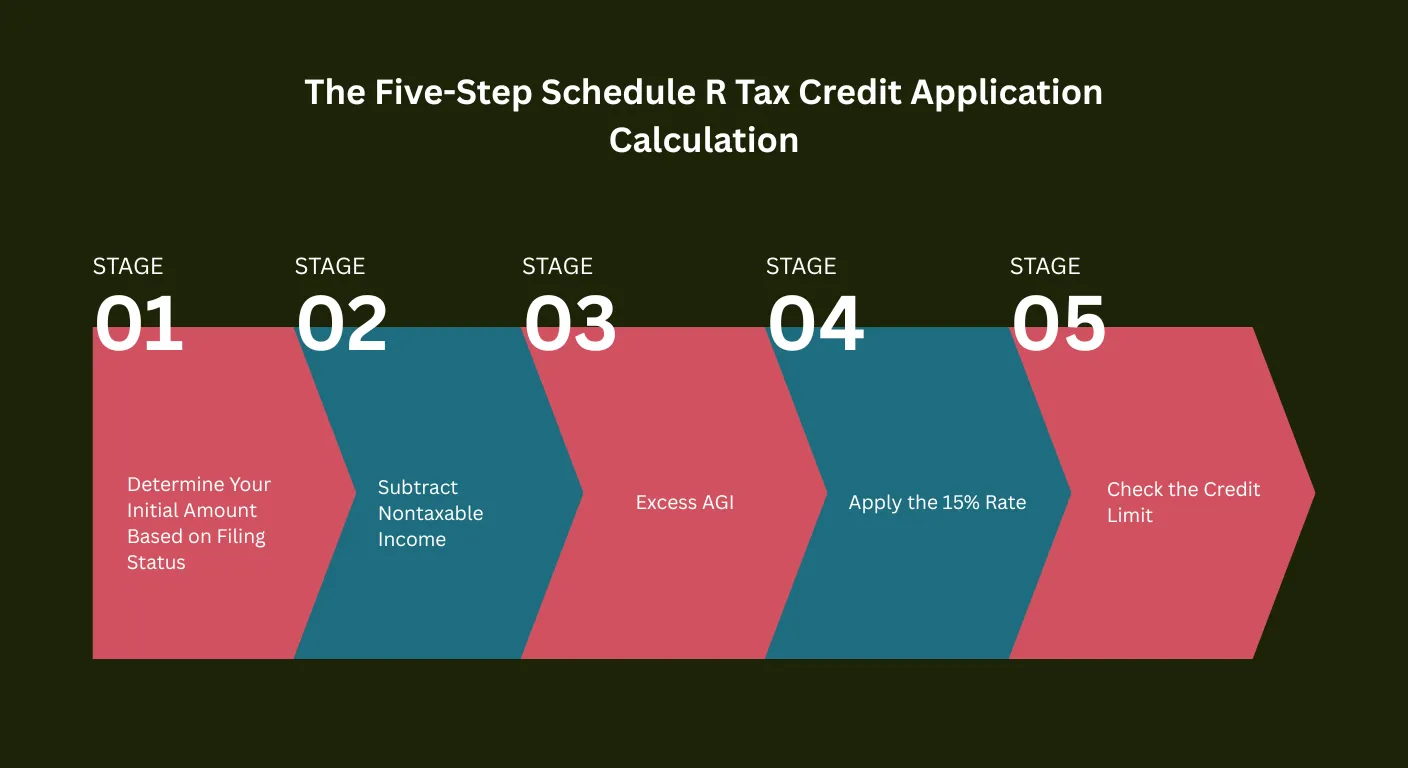
If you choose to calculate the Schedule R tax credit application amount yourself, the process follows five sequential steps. Each step reduces the base amount until you arrive at the final credit figure, which is then limited by your actual tax liability.
Step 1: Determine Your Initial Amount Based on Filing Status
The first step is to establish your initial amount, which is the ceiling before any reductions are applied. This amount is determined entirely by your filing status. For a single filer, qualifying widow or widower, or head of household aged 65 or older, the initial amount is $5,000. For married filing jointly where both spouses qualify, the initial amount is $7,500. For married filing jointly where only one spouse qualifies, the initial amount is $5,000. For married filing separately where you did not live with your spouse at any time during the year, the initial amount is $3,750. For filers under age 65, the initial amount cannot exceed the actual taxable disability income received for the year, so it may be lower than the filing-status maximum. These initial amounts are confirmed in the Schedule R instructions and form the starting point for the entire credit calculation.
Steps 2 and 3: Subtract Nontaxable Income and Excess AGI
Step 2 requires you to total all nontaxable Social Security benefits, nontaxable railroad retirement benefits, nontaxable pension income, and other nontaxable disability income received during the year. This combined total is subtracted from your initial amount. Step 3 then calculates your excess AGI. Your excess AGI is the amount by which your adjusted gross income exceeds the applicable AGI threshold for your filing status. If you are a single filer, for example, and your AGI is $19,500 while the threshold is $17,500, your excess AGI is $2,000. One-half of that excess amount, in this case $1,000, is then subtracted from the result of Step 2. The Schedule R instructions confirm that these reductions reflect the principle that the credit is targeted at lower-income seniors and disabled individuals, and that the benefit phases down as nontaxable income and AGI rise.
Steps 4 and 5: Apply the 15% Rate and Check the Credit Limit
Step 4 adds together the reductions from Steps 2 and 3. That combined total is subtracted from your initial amount to produce the amount on which you calculate the credit. Step 5 multiplies this remaining amount by 15 percent to arrive at the tentative credit. According to IRS credit for the elderly or disabled, the credit ranges between $3,750 and $7,500 depending on filing status and income, though the actual amount claimed by most filers is significantly lower because of the Step 2 and Step 3 reductions. The final check is the Credit Limit Worksheet, which ensures the credit does not exceed your total tax liability after other nonrefundable credits have been applied. Because Schedule R is nonrefundable, it can eliminate your tax bill but will not produce a refund.
How to Get Schedule R Filed With Your Tax Return
Understanding how to get Schedule R properly attached to your return is the final step that converts your calculation into an actual tax reduction. Several specific steps are required to make the filing complete and valid.
Attaching Schedule R to Form 1040 or 1040-SR
Schedule R must be completed and physically attached to your Form 1040 or Form 1040-SR when you file. According to the Schedule R instructions, you enter the final credit amount from Schedule R line 22 on Schedule 3 (Form 1040), line 6d. You also check box c on Schedule 3 next to that line and write “Sch R” on the adjacent line to identify the source of the credit. Form 1040-SR is the version of the federal income tax return designed specifically for taxpayers aged 65 or older, featuring larger print and a chart of the additional standard deduction amounts available to seniors. Either form is acceptable for claiming Schedule R, and both can be filed electronically with Schedule R as an attachment.
Entering the Credit on Schedule 3 Line 6d
The credit entry on Schedule 3 line 6d is where the Schedule R credit formally reduces your total tax. Schedule 3 is the supplemental form that collects nonrefundable credits from multiple sources. If the IRS is figuring the credit for you, write “CFE” on line 6d instead of an amount. If you calculated the credit yourself, enter the exact dollar figure from Schedule R line 22. The Schedule R instructions confirm that a completed Schedule R must be attached to the return in all cases, even when asking the IRS to figure the credit. Filing without attaching the schedule can result in the credit being disallowed. According to Publication 554, seniors preparing their returns should review all credits for which they may qualify, as the Credit for the Elderly or Disabled is among the most frequently overlooked items on the senior return.
Free Filing Help Through VITA and TCE Programs
If you need assistance completing your Schedule R or your broader tax return, free help is available. According to free tax preparation guidance, the IRS sponsors two programs specifically suited to seniors and people with disabilities. The Volunteer Income Tax Assistance (VITA) program offers free basic tax return preparation to qualifying individuals. The Tax Counseling for the Elderly (TCE) program provides free tax help specifically for taxpayers aged 60 and older, with volunteers who specialize in pension and retirement issues unique to seniors. According to 2026 TCE and VITA grant announcement, the IRS awarded $53 million in TCE and VITA grants in January 2026 to ensure free filing assistance reaches communities nationwide. To locate the nearest site, use the VITA Locator Tool at IRS.gov or call 800-906-9887.
How Schedule R Connects to Property Tax and Other Senior Benefits
The Schedule R tax credit application does not exist in isolation. For most seniors and disabled individuals, it is one piece of a broader benefits picture that includes state-level property tax relief, federal deductions, and program-based assistance that together can represent thousands of dollars in annual savings.
State Property Tax Exemptions That Pair With Schedule R
Most states offer property tax exemption or reduction programs specifically for seniors and people with disabilities. These programs are separate from federal tax law and are administered by county or municipal tax assessors. Qualifying criteria typically mirror or overlap with Schedule R eligibility, requiring the homeowner to be aged 65 or older or to have a qualifying disability, and to meet income thresholds. According to Publication 530, state and local real property taxes paid on your primary residence are deductible on Schedule A when you itemize federal deductions, meaning that any reduction in property tax through a state exemption program also reduces the amount available for the federal itemized deduction. For seniors who do not itemize and instead take the standard deduction, state property tax exemption programs provide direct cash savings on the property tax bill itself without affecting the federal return. Seniors who qualify for Schedule R based on age or disability status should simultaneously check with their local tax assessor’s office for current property tax relief programs.
The New 2026 Enhanced Deduction for Seniors That Stacks on Top
In addition to Schedule R, a significant new tax provision is available to seniors for tax years 2025 through 2028. According to IRS new and enhanced deductions for individuals, seniors aged 65 and older may claim an additional $6,000 deduction per person ($12,000 for a married couple where both spouses qualify). This enhanced deduction is available whether you take the standard deduction or itemize, and it phases out for single filers with modified AGI above $75,000 and joint filers above $150,000. Crucially, this deduction and the Schedule R credit serve different functions. The enhanced deduction reduces taxable income before the tax is calculated. Schedule R then reduces the tax itself. Claiming both where eligible compounds the benefit, and for many seniors the combination can eliminate federal income tax liability on a moderate fixed income entirely.
Rocket Records: Finding Every Tax Benefit You Qualify For at Once
Completing a Schedule R tax credit application is one step, but it is rarely the only step worth taking. Seniors and disabled individuals qualifying for Schedule R frequently also qualify for disability parking permits, Medicare Savings Programs, prescription cost reduction programs, state property tax exemptions, the enhanced deduction for seniors, medical expense deductions under IRS Publication 502, and FMLA job protection. Each benefit has a different application process, a different agency, and a different eligibility window. Rocket Records was built to address this problem directly. The platform is trusted by over 250,000 Americans and uses artificial intelligence to scan your health profile, age, income, and current benefits status against 25 or more federal and state programs simultaneously. The scan takes under five minutes, the platform is fully HIPAA compliant, and all required paperwork is pre-filled so you can begin claiming benefits immediately. Members report saving over $3,000 in their first year on average.
You may qualify for Schedule R, state property tax relief, prescription assistance, and more all from the same conditions. Rocket Records finds everything in one scan: Start Your Free Benefits Scan at Rocket Records






 Ask ChatGPT
  Ask Claude
  Ask Perplexity